

If you have spent any time on a construction project, you have probably heard someone mention the DPR. But what is a DPR, exactly, and why does it show up in nearly every project conversation? On any active jobsite, dozens of things happen between sunrise and quitting time. Crews show up, materials get delivered, weather shifts, equipment runs, and sometimes work stalls for reasons nobody could have predicted that morning. A DPR is the document that captures all of it before the details fade from memory.
This article explains what a DPR is in construction, what it should include, why it matters to a project team, and how it gets prepared, reviewed, and stored on a typical jobsite.
What does DPR stand for?
DPR stands for Daily Progress Report. In plain terms, it is a dated record of what happened on a construction site during one workday, covering who was on site, what work was completed, what materials were used, and what issues came up. People new to a project often ask what DPR means or what does DPR stand for before realizing it is simply industry shorthand for a formal daily report. The full form of DPR is consistent across most of the construction industry, though the document goes by different names depending on the company, the region, or the software platform being used.
Unlike a personal notebook or a rough site note, a DPR follows a consistent structure, gets reviewed by someone other than the person who wrote it, and becomes part of the official project file. That distinction matters because the report is often referenced long after the day it describes, sometimes months or years later, when a schedule dispute, billing question, or insurance claim comes up.
Learn more: What is AIA billing
What does a DPR include?
A complete daily progress report captures the who, what, when, where, and why of a single workday. While the exact format varies by company and project type, most reports include the following information.
- Project and report identifiers: Project name, location, date, and a sequential report number so records can be tracked over time.
- Weather conditions: Temperature, precipitation, and wind, along with any weather-related delays or stoppages.
- Crew on site: Workers present by trade or company, hours worked, and which subcontractors were active that day.
- Visitors and inspections: Owner representatives, inspectors, engineers, or other parties who visited the site, along with the reason for the visit.
- Work completed: A description of the tasks finished that day, tied back to the project schedule wherever possible.
- Materials: What was delivered, what was used, and what remains on hand or is still needed.
- Equipment: Machinery on site, hours of use, and any idle time or breakdowns.
- Delays and issues: Anything that disrupted the planned schedule, along with requests for information or clarification raised that day.
- Safety records: Incidents, near misses, and any toolbox talks or safety briefings held that day.
- Photographs: Site images showing completed work and current conditions, used to support the written entries.
- Sign-off: The name and signature of the supervisor or site lead responsible for the report.
Learn more: 3 Phases of Construction: The Construction Phase Explained
Why DPRs matter on a construction project
The daily progress report can feel like routine paperwork in the moment, but it serves several functions that become important well after the day it describes.
- Schedule and progress tracking: Daily entries make it possible to compare planned progress against actual progress. When a project starts to fall behind, the report history usually shows exactly when and why, rather than leaving the team to guess.
- Billing and cost support: Pay applications, change orders, and cost justifications often rely on daily records of labor, materials, and equipment use. A consistent daily progress report makes it far easier to back up an invoice with documented evidence rather than memory.
- Dispute and claim documentation: When disagreements arise over delays, defects, or scope, the daily progress report is often the most reliable record available. Because it was written close to the time the events occurred, it carries more weight than a recollection assembled weeks or months later.
- Safety and compliance: Daily entries on incidents, near misses, and safety briefings create a documented history that supports compliance recordkeeping and shows that reasonable steps were taken to maintain a safe site.
- Communication across the team: The report gives project managers, owners, and other stakeholders who are not physically on site a clear, consistent view of progress. This reduces the need for status update calls and keeps everyone working from the same information.

What is a DPR vs. Daily Log vs. Daily Report?
People often wonder if a DPR is different from a daily log or a daily report. In practice, these terms describe the same underlying document. The differences are mostly in naming convention rather than content:
| Term | Where it is commonly used | What it typically covers |
| Daily Progress Report (DPR) | International contracting, infrastructure, and large-scale projects | A full daily record of work completed, resources used, weather, and safety |
| Daily Log | Construction management software platforms | The same categories of information, often organized into separate modules such as labor, equipment, weather, and notes |
| Daily Report or Daily Field Report | Smaller contractors and paper-based jobsites | The same content, traditionally captured on a single-page form |
How a DPR is prepared on a typical jobsite
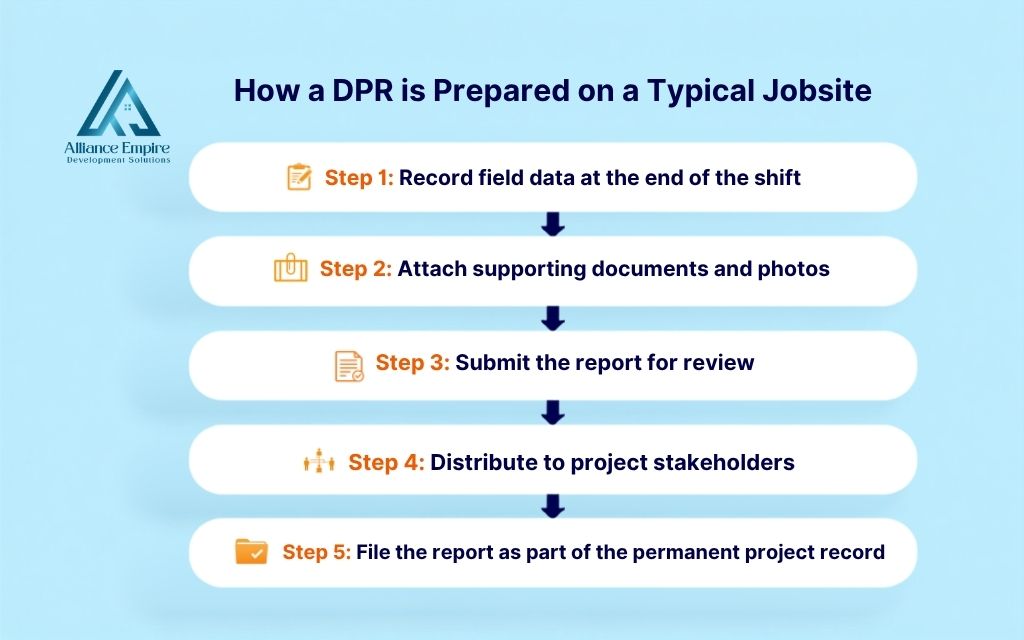
While the exact workflow varies by company and project size, most daily progress reports move through the same five steps before they become part of the permanent project record.
Step 1: Record field data at the end of the shift
The site supervisor, foreman, or site engineer fills in the report toward the end of the workday while details are still fresh. This includes logging crew counts, hours worked, tasks completed, materials received, equipment used, and any delays or safety incidents that occurred. Recording the data the same day it happens is the single most important habit in daily reporting.
Step 2: Attach supporting documents and photos
Once the written entries are complete, the preparer attaches any supporting material from that day. This typically includes site photographs showing work progress, delivery tickets, inspection sign-off sheets, and any written communications or RFIs raised during the shift. Attachments turn a written summary into a verifiable record.
Step 3: Submit the report for review
The completed report is submitted to a project manager or designated reviewer, usually through a shared platform, email, or physical handoff depending on the system the company uses. The reviewer checks for accuracy, completeness, and consistency with the previous day’s entries before approving the report.
Step 4: Distribute to project stakeholders
After approval, the report is shared with the parties who need visibility into daily site activity. Depending on the project structure, this may include the owner, the architect, the general contractor, or the client representative. On projects using construction management software, distribution often happens automatically once the report is approved.
Step 5: File the report as part of the permanent project record
The approved and distributed report is archived as an official project document. Most companies retain daily progress reports for the full duration of the project and well beyond, since they may be needed years later to support a billing dispute, an insurance claim, or a legal review. A complete, unbroken record of daily reports is one of the most valuable assets a construction team can have at project closeout.
Common DPR mistakes and challenges to avoid
Even well-intentioned reporting can fall short if certain habits creep in. Some of the most common issues include the following.
- Filling out reports late: Writing a daily progress report from memory a day or two after the fact almost always results in missing or inaccurate details.
- Vague entries: Descriptions like “worked on framing” without quantities, locations, or specifics make the report far less useful later.
- Skipping weather data, even on clear days: The absence of a weather entry can itself become a problem if a delay claim later depends on proving what conditions were like on a specific date.
- Forgetting visitors and inspections: Leaving out who visited the site and why creates gaps in the record that are hard to fill in retroactively.
- Inconsistent reporting between crews or shifts: When different people fill out reports in different formats or with different levels of detail, the overall project record becomes harder to rely on.
- Treating documentation as an afterthought: On some projects, daily reporting is seen as an administrative burden rather than a core part of the job, which leads to reports that are rushed, incomplete, or skipped entirely. Building daily reporting into the normal end-of-day routine is usually the simplest fix.
Learn more: Construction work package
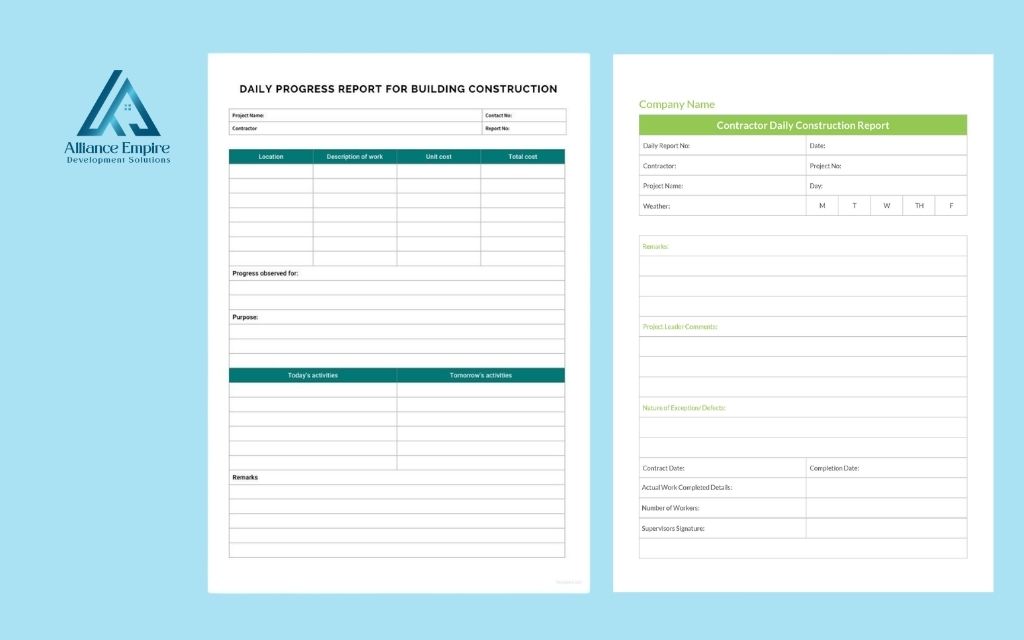
DPR formats and templates
Construction teams use a few common formats to prepare daily progress reports:
- Paper forms: Still used on smaller jobs or by teams that prefer a simple, low-tech process. Paper forms are easy to start with but harder to search, share, or analyze later.
- Spreadsheet templates: A common middle ground, often built in Excel or a similar program, that allows for some customization while remaining easy to distribute by email.
- Construction management software: Many platforms now include a built-in daily log or daily report feature that standardizes the format, attaches photos automatically, and distributes the finished record to stakeholders without manual steps.
Conclusion
Understanding what is a DPR in construction is the first step toward using it well. The daily progress report is a simple document with an outsized impact on how a project runs. By capturing the day’s work, resources, weather, and safety information in a consistent format, it supports accurate scheduling, defensible billing, and a reliable record if questions or disputes come up later.
If you are planning a construction or roofing project and want a contractor who documents work transparently from day one, Alliance EDS has been doing exactly that for property owners across the Denver area for over 15 years. Call us at (720) 484-8181 to get your free inspection today.
Frequently asked questions (FAQs)
What is a DPR in construction?
A DPR, or Daily Progress Report, is a formal dated record of everything that happened on a construction site during one workday, including work completed, crew on site, materials used, equipment deployed, weather conditions, and any safety incidents or delays.
What is the full form of DPR?
The full form of DPR is Daily Progress Report. It is a standardized daily record used by construction teams to document site activity and track project progress.
Is a DPR the same as a daily log?
Yes, in most cases. A daily log and a DPR cover the same categories of information. The difference is mainly in naming, which often depends on the software platform or company convention being used.
Who is responsible for preparing the DPR?
The report is typically prepared by the site supervisor, foreman, or site engineer, then reviewed by a project manager or another designated reviewer before it is finalized.
Can a DPR be used as evidence in a dispute?
Yes. Because a DPR is created close to the time the events occurred, it is often treated as a reliable, contemporaneous record when delays, defects, or scope disagreements need to be reviewed later.