
The master schedule sets the plan for an entire project, but site conditions rarely match it week to week. Crews fall behind on other jobs, permits sit in review, and material deliveries slip past their promised dates.
These details only become clear a few weeks before work starts. The look ahead schedule closes that gap. It turns the master schedule’s long-term logic into a short-term plan crews can execute, confirming what is actually ready before anyone shows up on site.
Definition of a look ahead schedule
The look ahead schedule is a short-term planning view pulled from the master schedule. It narrows the project’s full timeline down to a rolling window, usually two to six weeks, and breaks that window into specific tasks crews can prepare for and complete.
This tool is often called a lookahead schedule or a construction look ahead schedule, and the terms are used interchangeably across the industry.
Shrinking the master schedule’s timeframe is not the same as building a look ahead schedule. The look ahead adds detail the master schedule was never meant to carry: confirmed material deliveries, crew availability, open RFIs, and outstanding inspections. That detail is what determines whether upcoming work is ready for the field.

Benefits of using a look ahead schedule
Breaking the master schedule into near-term detail gives field teams a clearer picture of what happens next. The benefits show up across scheduling, coordination, and daily execution.
- Confirms work is ready before crews mobilize, cutting down on false starts and idle time
- Improves coordination between trades by making short-term sequencing and handoffs visible
- Strengthens weekly commitments because promises are based on real constraints, not assumptions
- Surfaces schedule risk weeks in advance, giving teams time to react before it affects milestones
- Shifts planning conversations earlier, reducing pressure and rework caused by last-minute decisions
Choosing a 2-week, 3-week, or 6-week look ahead window
Most construction teams choose a two, three, or six week window, and the right length depends on how the project actually runs. Several factors make that choice easier.
- Trade density: Projects with several overlapping trades usually need a shorter window, often a two week look ahead construction schedule, so sequencing stays accurate
- Procurement lead times: Projects waiting on long lead materials or equipment benefit from a six week window that gives more advance warning
- Site complexity: Straightforward interior work can run on a two week look ahead schedule, while coordination-heavy phases often need the full six weeks
- Team capacity: Many superintendents default to a three week look ahead schedule because it balances enough lead time with enough accuracy
What information a look ahead schedule should contain
Useful look ahead schedules answer three questions for every activity: what work will happen, when it happens, and who owns it. Missing any of those three points means the schedule lacks the detail needed to support fieldwork.
The following fields typically appear in a complete look ahead schedule.
- Activity descriptions broken into daily or weekly tasks
- Start and finish dates for each activity
- The responsible trade contractor or crew leader
- Predecessor work and handoff status
- Material and equipment requirements for each task
- Permit, inspection, and approval status
- Constraint flags for anything that could block progress
- A progress tracking column updated weekly

How to create a look ahead schedule
Start from the approved master schedule
Every look ahead schedule starts with the approved master schedule, which stays the authoritative plan for the project. The look ahead schedule does not override baseline dates or contractual milestones. It simply narrows focus to the next few weeks while respecting the sequencing already established at the project level.
Select the look ahead window
Pick a window length that matches how far ahead the team can plan with confidence, typically two, three, or six weeks. Shorter windows suit fast-moving interior work, and longer windows help coordination-heavy phases where approvals or material readiness need earlier visibility.
Pull and break down upcoming activities
Extract only the activities that fall inside the selected window from the master schedule, leaving out long-term tasks that add no value to this view. If an activity is too broad to manage, break it into smaller work packages that reflect how crews will actually perform the work.
Check constraints and readiness
Review each activity to confirm materials are ordered or delivered, labor and equipment are available, permits and inspections are secured, and predecessor work is complete. Flag any missing prerequisite immediately so it can be resolved before crews are scheduled.
Sequence work to match field conditions
Adjust durations based on current productivity, resequence tasks where access or space is limited, and align work with how crews actually move through the site. This step turns schedule logic into a plan that reflects weather, staffing, and real field conditions.
Coordinate with subcontractors and trade leads
Review the draft with subcontractors, foremen, and field supervisors before finalizing it. This conversation is where assumptions get tested and handoffs get clarified. Confirming what each trade can realistically commit to turns the schedule into a shared plan instead of a directive handed down from the office.
Assign responsibility for each activity
Name a specific person responsible for executing and coordinating every activity in the window. Clear ownership strengthens accountability and speeds up follow-up when something falls behind schedule.
Update the schedule weekly and roll it forward
Update the look ahead schedule every week by removing completed tasks, adding newly visible activities, and reassessing constraints. This rolling process keeps the plan relevant and lets teams respond to changes without losing control of near-term work.
Identifying and removing constraints
Skipping constraint checks is the most common reason a look ahead schedule fails to prevent delays. Logging constraints consistently turns that check into a repeatable habit for the whole team.
Constraints generally fall into a handful of categories.
- Materials and equipment that have not been ordered or delivered
- Open RFIs or unresolved design questions
- Crew or labor availability
- Incomplete predecessor work
- Permits, approvals, or inspections still pending
- Site access or space limitations
For every activity entering the window, note what is missing, assign an owner to resolve it, and set a target date. Reviewing that log at the weekly meeting is what separates a look ahead schedule that prevents problems from one that only documents them.
Coordinating trades and resources
Coordination is where a look ahead schedule earns its value, since most delays trace back to a handoff or a resource that was not confirmed in time:
- Trade and crew coordination: showing short-term sequencing clearly helps superintendents resolve handoff conflicts, adjust crew stacking, and confirm who works where during the coming weeks.
- Materials and equipment coordination: long lead items need confirmed delivery dates tracked against the work they support, so a delivery falling behind gets caught before it stalls a crew.
- Inspections and approvals: booking inspections early and tracking their status inside the schedule prevents avoidable downtime, since missed inspection windows are a common cause of short-term slippage.

Look ahead schedule templates and software
Teams build look ahead schedules with two general approaches, and the right one depends on project size and how connected the schedule needs to stay to the master plan.
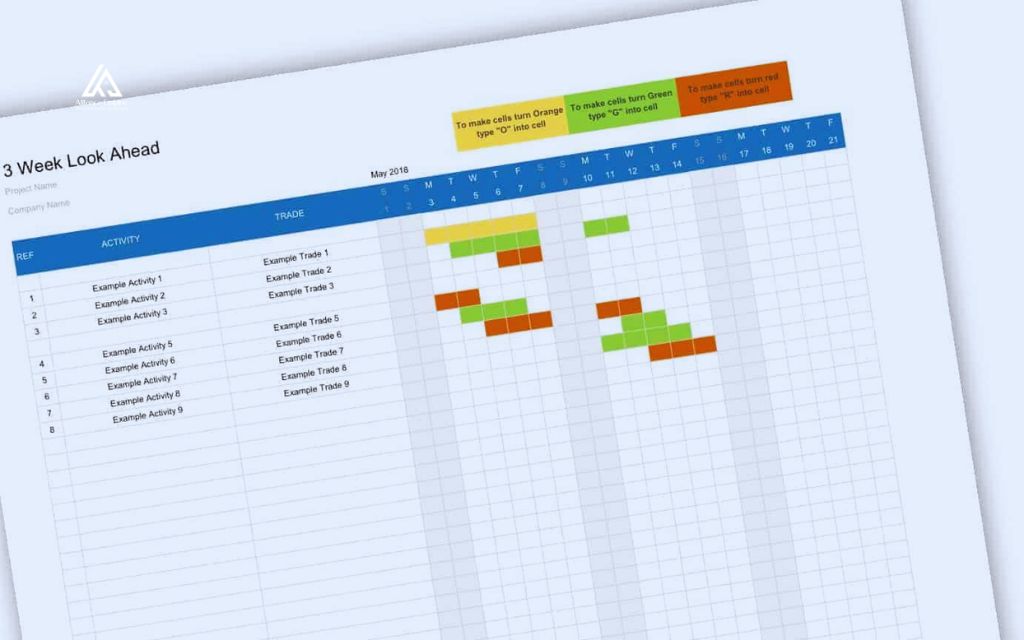
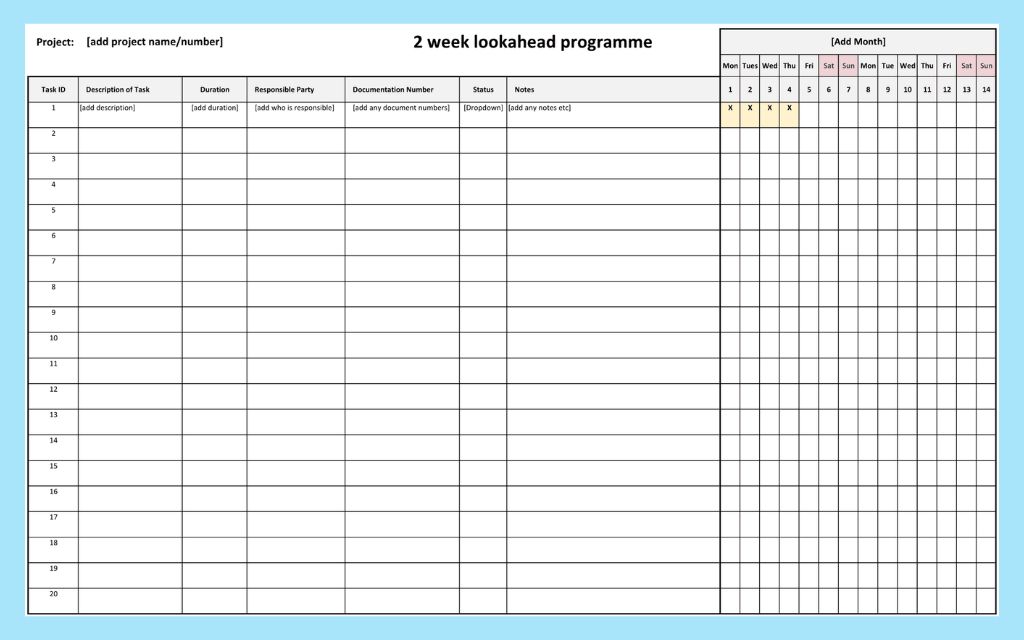
Many teams start with a construction look ahead schedule template in a spreadsheet, using columns for activity, dates, responsible party, constraints, and status. Two week look ahead templates work well for fast-moving trade sequences, while longer formats suit coordination-heavy phases.
The tradeoff is that a spreadsheet must be updated by hand, and it can drift from the master schedule if nobody keeps the two in sync.
Scheduling software takes a different approach. It can pull the look ahead directly from the master schedule and keep both views in sync automatically, removing the manual re-entry that spreadsheets require. Most platforms also let field teams update progress from a phone or tablet, so changes reach the office the same day instead of at the next status meeting.
Real-life look ahead schedule examples by project type
Look ahead schedules take a similar shape across project types, though the activities being tracked change with the work:
- Commercial buildings: A three week look ahead schedule might track concrete pours, steel deliveries, and inspections, confirming formwork is ready and materials are on site before crews mobilize.
- Residential projects: The look ahead often focuses on framing, electrical rough-in, and drywall, sequencing trades so each one starts as soon as the previous crew finishes.
- Infrastructure projects: The look ahead schedule commonly tracks grading, paving, and utility installation, coordinating equipment, materials, and lane closures so work continues without interruption.
Conclusion
Look ahead schedules work because they do the thing a master schedule cannot: confirm that upcoming work is actually ready for the field. Choosing the right window, tracking the fields that matter, and removing constraints before crews arrive are what turn a good plan into reliable execution.
Alliance EDS, based in Denver, Colorado, works with project teams that need dependable scheduling and field coordination on active construction projects. Call (720) 484-8181 to talk with the team about scheduling support for an upcoming project.
Frequently asked questions (FAQs)
What is the difference between a 2-week and a 3-week look ahead schedule
Two week look ahead schedules focus on the next fourteen days and work best for fast-moving, detail-heavy phases. Three week versions give a bit more lead time for procurement and approvals while staying close enough to current conditions to remain accurate. Most teams pick between them based on trade density and how far ahead they can plan with confidence.
Who is responsible for creating the look ahead schedule
The superintendent or project manager usually leads the process, though the most reliable schedules include input from trade foremen and subcontractors. People doing the actual work are best positioned to confirm whether an activity is truly ready.
How often should a look ahead schedule be updated
Weekly updates are standard practice. Schedules that go more than a week without review quickly fall out of step with site conditions, which defeats the purpose of tracking constraints in the first place.
Is a look ahead schedule the same as a weekly work plan
No. The look ahead schedule shows what work is possible and ready over the coming weeks, while the weekly work plan captures the specific tasks each crew commits to finishing that week. The weekly plan is built from activities the look ahead has already confirmed as ready.
Can a look ahead schedule replace the master schedule
No. The look ahead schedule works from the master schedule rather than replacing it. Contractual dates, milestones, and the overall project baseline still live in the master schedule, and the look ahead only narrows focus to near-term execution.
Is a look ahead schedule part of the Last Planner System
Yes. The Last Planner System, developed by the Lean Construction Institute, formally connects the master schedule, the look ahead schedule, and the weekly work plan. Within that framework, look ahead planning typically covers a six week horizon focused on identifying and removing constraints before work enters the weekly plan.