


Construction projects generate enormous volumes of information, from architectural drawings and cost estimates to inspection reports and closeout documents. When that information lives in dozens of disconnected folders and email threads, teams lose time chasing down the latest file version, and mistakes creep into the build. The common data environment, often shortened to CDE, solves this problem by giving every project stakeholder one trusted place to store, share, and manage project information throughout the asset lifecycle.
This guide explains what a CDE is, how it works, and how it reduces the information silos, outdated documents, and communication breakdowns that slow down construction projects. It also covers the ISO 19650 principles behind a modern CDE, the roles that rely on it, and what to consider before implementing one.
What is a common data environment?
The term common data environment, often shortened to CDE, describes the single source of information used to collect, manage, and share documentation, models, and project data for the whole project team. Rather than storing files across separate hard drives, inboxes, and personal cloud folders, everyone works from the same centralized platform, so the most current version of a drawing, specification, or model is always the one people are looking at.
People often ask what CDE stands for or what a CDE actually means in practice. CDE stands for common data environment, and the concept was first formalized as part of UK BIM Level 2 standards before becoming a global information management practice under ISO 19650.
It helps to separate two related ideas: the CDE process and CDE software. The process is the agreed set of rules and responsibilities that govern who creates, reviews, approves, and publishes each document or model. CDE software, sometimes marketed as a common data environment platform, is simply the tool that supports that process, and no platform creates a working CDE without it.
Document management systems, or DMS, mainly store and retrieve files. Construction CDE platforms go further, adding version control, approval stages, model coordination, and a status system showing whether information is in progress, shared, or published. This matters most on complex projects, where teams need to track exactly who approved each revision, and when.
For most contractors, project managers, and BIM managers, understanding this difference, process first, software second, prevents a common and costly mistake: buying a data environment platform and assuming the workflow problems will fix themselves.

What types of data can be stored in a common data environment?
Common data environment platforms are built to hold far more than drawings. The following file types typically live inside a well-organized CDE:
- Drawings and 3D models: CAD files, BIM models, and coordination views used across design and construction phases.
- Specifications and reports: Technical specifications, inspection reports, and quality documentation tied to specific work packages.
- Contracts and project documentation: Agreements, schedules, budgets, and other administrative records that support the project.
- Communication records: Emails, meeting minutes, and decision logs that create an accurate project history.
- Asset and BIM data: Structured BIM data used for facility management once construction is complete.
- Site photos and videos: Progress documentation captured in the field and linked back to specific locations or tasks.
Current challenges without a common data environment
Before adopting a common data environment, many project teams run into the same recurring problems:
- Disconnected software: Design, scheduling, and field tools that do not talk to each other, leaving information scattered across systems.
- No central hub: Without one source of truth, opinions start to carry more weight than facts, and small disagreements turn into disputes.
- Lost or outdated data: Information gets lost as files move between teams and phases, especially during handoffs between design and construction.
- Inconsistent workflows: Every team follows its own process, which leads to confusion about who is responsible for what.
- No shared standards: Naming conventions, file formats, and approval steps vary from one contributor to the next.
- Eroded trust: When information keeps changing or going missing, people start blaming colleagues, software, or both.
Benefits of adopting a common data environment
Once a common data environment process is in place, most of the challenges above start to disappear. Typical benefits include:
- Better collaboration: All project data flows into one centralized system, improving coordination across design, construction, and ownership teams.
- A single source of truth: Team members access the same real-time plans and data, which supports faster, more confident decisions.
- Higher efficiency and quality: Less time is spent recreating lost data, which reduces input errors and rework.
- Lower project risk: Better visibility into project information supports more accurate forecasting and fewer surprises.
- Stronger security: Defined permissions give administrators control over who can view, edit, or publish sensitive information.
ISO 19650 principles behind a common data environment
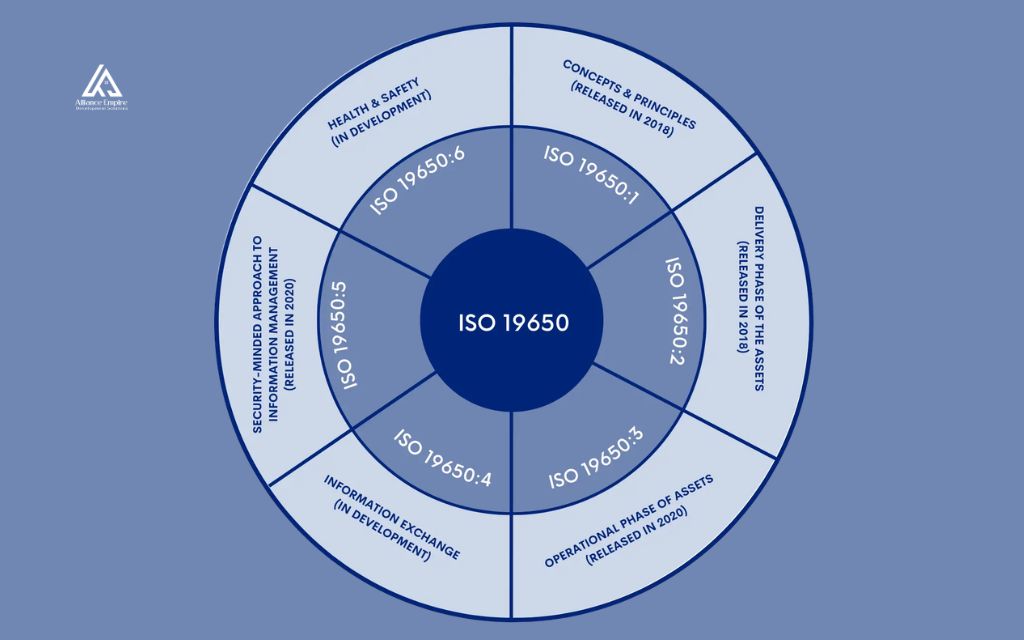
Modern common data environment practices follow ISO 19650, the international standard for managing information over an asset’s life cycle using building information modeling. It replaced the older UK frameworks that introduced the CDE concept and now guides US teams on BIM-based projects. ISO 19650 defines a CDE as an agreed source of information managed through a controlled process, so every document has one authoritative version.
To meet this standard, a CDE needs unique identifiers and naming conventions, a suitability status marking information as work in progress, shared, or published, controlled revisions with superseded versions archived, and audit trails logging every change.
Key features of a common data environment
Beyond meeting ISO 19650 requirements, an effective CDE typically includes the following core features:
- Centralized information: One repository holds documents, models, and data for the entire project team.
- Version control: Users always work from the current version of a file, with older versions preserved for reference.
- Permissions: Access rights determine who can view, edit, comment on, or approve specific information.
- Approvals: Structured workflows route documents through review and sign-off before they become official.
- Audit trails: A complete history shows what changed, who changed it, and when.
Attributes of an effective common data environment
Not every data environment lives up to its potential. The most effective CDE platforms share these attributes:
- Easy to use: Minimal training is needed for teams to start working in the system productively.
- Accessible: Cloud-based access lets authorized users reach project information from the office or the job site.
- Integrated: The platform connects with existing design, estimating, and project management tools instead of working in isolation.
- Standardized and scalable: Workflows and naming conventions stay consistent whether the project is small or large.
- Secure: Confidential business and project information stays protected through defined access controls.

How a common data environment supports BIM coordination
Building information modeling relies heavily on a common data environment to give every discipline, architecture, structural, mechanical, electrical, and civil, one centralized model to design against. Instead of exchanging isolated files by email, contributors publish their models into the CDE, where they are combined into a federated model for coordination and clash detection. This setup makes it possible to identify conflicts between systems, such as ductwork clashing with structural beams, before construction begins rather than after materials are already on site.
Common data environment BIM workflows also give contractors and owners view access to the latest model without needing a full BIM software license, so field teams can extract measurements or generate reports directly from the current design. This level of coordination is difficult to achieve with a platform that only stores flat files, which is why BIM support has become a standard expectation for construction CDE platforms.
Common data environment in practice: Real construction workflows
Drawings, models, and revisions
Design teams issue new drawing revisions frequently throughout a project, and every revision needs to reach the right people without confusion about which version is current. Inside a common data environment, each new issue automatically supersedes the previous one, moves through a defined suitability status, and triggers a notification to anyone subscribed to that document. Field crews pulling drawings from a tablet on site see the same current revision that the architect just published, eliminating the risk of building from an outdated set.
RFIs, submittals, and approvals
Requests for information, commonly called RFIs, can pass through several reviewers before they are answered, and a submittal can involve even more stakeholders before it is approved for procurement or installation. Housing these workflows inside a common data environment keeps every question, response, and approval attached to the original document, with automatic alerts letting reviewers know when action is needed. Because the full history stays visible, project teams can trace exactly when a decision was made and who made it, which reduces disputes during closeout and warranty claims.
Who uses a common data environment
Many different roles rely on a common data environment, though access and involvement vary by position. General contractors and project managers use it to coordinate schedules, submittals, and field information, while BIM and VDC managers oversee model coordination, clash detection, and federation standards.
Architects and engineers publish design updates and respond to review comments, and owners track project progress and keep a complete information record for future facility management. Document controllers, subcontractors, developers, and design managers also draw on the CDE for their piece of the project, from managing file status and naming conventions to coordinating information exchange between disciplines.

Choosing and implementing a common data environment
Selecting a common data environment platform is only part of the process. Teams evaluating a new system should also ask:
- How will the team build buy-in? Without support from leadership and field staff, even a well-chosen platform can go unused.
- Where should the rollout start? A pilot project or a single department is usually easier to manage than a company-wide launch.
- How will workflows be standardized? Naming conventions, folder structures, and approval steps need to be defined before go-live.
- Who will administer the system? Someone needs to own file structure, permissions, and day-to-day troubleshooting.
- What does success look like? Clear goals make it possible to measure whether the CDE is actually reducing errors and rework.
Conclusion
Construction teams that adopt a common data environment turn scattered project information into a single, trusted source, from design through facility handover. Combining version control, approval workflows, and BIM coordination in one platform cuts the information silos, outdated documents, and communication breakdowns that drive up rework.
Alliance EDS works with contractors, owners, and design teams across Denver, Colorado on projects where clear information management makes the difference between a smooth build and a costly one. If your team needs guidance on setting up reliable construction workflows, from documentation to project coordination, contact us at (720) 484-8181.
Frequently asked questions (FAQs)
Is a CDE the same as BIM?
No. Building information modeling is a process for creating and managing digital models, while a common data environment is the platform and workflow used to store, share, and control that model and the documents around it. BIM can exist without a formal CDE, but a CDE makes BIM coordination far more reliable.
Does a CDE replace a document management system?
Not entirely. Every CDE handles document storage, but it adds version control, approval workflows, and model coordination that a basic document management system usually lacks. Many teams describe the CDE as a DMS with construction-specific rules built in.
Does implementing a CDE require BIM software?
No. Plenty of construction CDE platforms manage contracts, RFIs, submittals, and photos without any BIM component at all. BIM support becomes relevant mainly on projects using 3D coordination, but it is not a requirement for adopting one.
Who owns the information stored in a CDE?
Ownership typically stays with whoever created the information. Architects retain ownership of their design models, contractors retain ownership of their submittals, and so on. Contributors usually license their content for use within the project, while the client or lead consultant coordinates how that information gets combined into the shared model.
What does CDE stand for?
CDE stands for common data environment. The abbreviation is used throughout construction, architecture, and engineering to refer to the centralized platform and process that manages project information.